Mathematics & Education · Computing reference
ASCII Chart for Decimal, Hex, Binary and Characters
Look up every standard ASCII value from 0 to 127. Compare decimal, hexadecimal, octal, seven-bit binary, Unicode code points, control mnemonics, printable characters, escapes, and line endings.
Treat control characters and terminal escape sequences carefully. They can trigger actions instead of displaying text. Verify the receiving format before inserting raw controls. See the ChartsLoom Disclaimer.
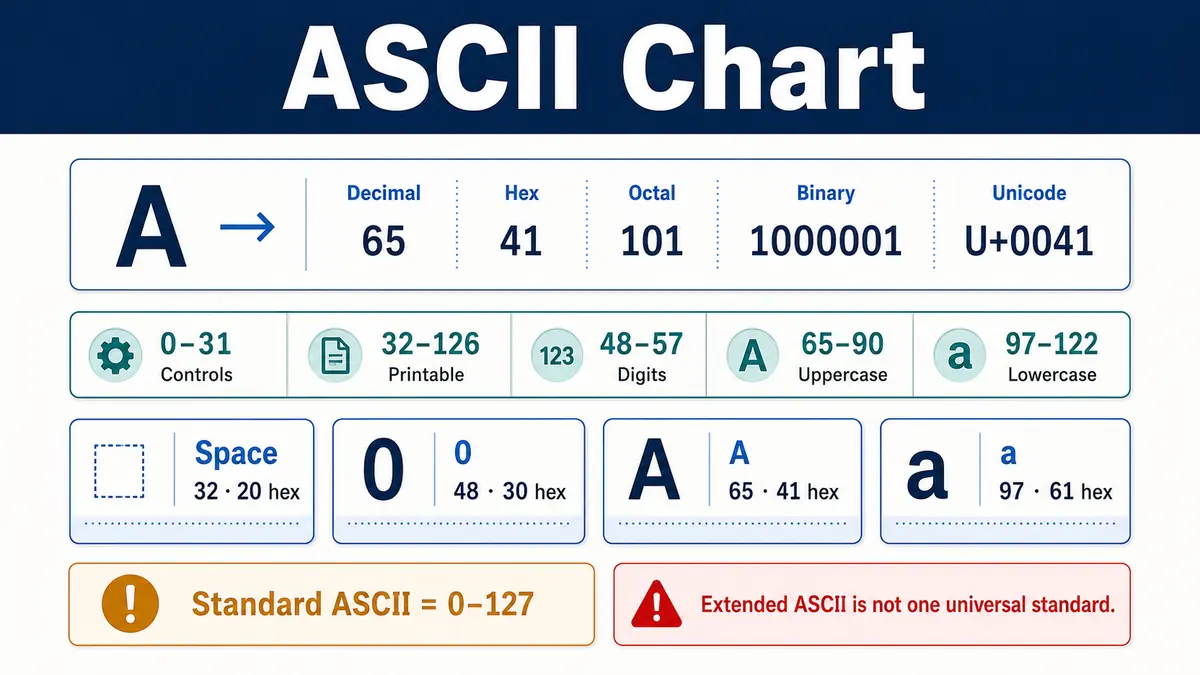
What does an ASCII chart show?
An ASCII chart maps each standard value from 0 through 127 to a control function or printable character and shows the same value in decimal, hexadecimal, octal, binary, and Unicode notation.
The RFC Editor ASCII standard defines the seven-bit code positions and control mnemonics used in this reference. Unicode preserves the same range as U+0000 through U+007F.
Code space
128 values
Standard ASCII uses decimal values 0–127 because seven bits provide 128 combinations.
Printable range
32–126
The printable range contains space, punctuation, digits, uppercase letters, lowercase letters, and symbols.
Case offset
32 decimal
Matching basic uppercase and lowercase letters differ by 32 code values in ASCII.
UTF-8 relationship
Same first 128
Every ASCII character uses the same one-byte value when text is encoded as UTF-8.
Core ASCII questions answered
These short answers cover code size, printable ranges, common values, controls, line endings, UTF-8 compatibility, and the meaning of extended ASCII.
How many values are in standard ASCII?
Standard ASCII contains 128 values from decimal 0 through 127.
Is ASCII a 7-bit or 8-bit code?
Standard ASCII is a 7-bit code; an 8-bit storage byte can carry one ASCII value with its high bit clear.
How many ASCII characters are printable?
ASCII has 95 printable characters from decimal 32 through 126, including space.
What is ASCII 32?
Decimal 32 is the space character, written as hexadecimal 20 and Unicode U+0020.
What is ASCII 65?
Decimal 65 is uppercase A, equal to hexadecimal 41 and binary 1000001.
What is ASCII 97?
Decimal 97 is lowercase a, equal to hexadecimal 61 and binary 1100001.
What values contain the digits?
ASCII digits 0–9 occupy decimal values 48–57 and hexadecimal 30–39.
What is the newline code?
Line feed is decimal 10; many systems use it as newline, while CRLF uses decimal 13 followed by 10.
What is the tab code?
Horizontal tab is decimal 9, hexadecimal 09, and commonly written as the escape sequence \t.
Is extended ASCII standard ASCII?
No. Values 128–255 require a separately named 8-bit encoding and do not have one universal meaning.
Is ASCII the same as Unicode?
No. ASCII has 128 values; Unicode defines a much larger character repertoire and preserves ASCII at U+0000–U+007F.
Can control codes be printed normally?
No. Control codes have no standard visible glyph, although software may show a mnemonic or placeholder.
How the 128 ASCII values are organized
ASCII groups related characters into consecutive numeric ranges. This structure makes digit and letter tests straightforward, but control codes and punctuation still need exact lookup.
0–31
Controls
NUL through US
32
Space
Blank separator
33–47
Symbols
! through /
48–57
Digits
0 through 9
58–64
Symbols
: through @
65–90
Uppercase
A through Z
91–96
Symbols
[ through `
97–122
Lowercase
a through z
123–126
Symbols
{ through ~
127
DEL
Delete control
ASCII Code Ranges at a Glance
Standard ASCII uses values 0–127. The ranges separate nonprinting controls, space, punctuation, digits, uppercase letters, lowercase letters, and DELETE.
Swipe horizontally inside the table to view every column.
| Decimal range | Hex range | Count | Category | What appears there |
|---|---|---|---|---|
| 0–31 — C0 controls | 00–1F | 32 | C0 control codes | NUL through US; mostly nonprinting control functions |
| 32 | 20 | 1 | Space | A printable blank separator |
| 33–47 | 21–2F | 15 | Punctuation and symbols | ! through / |
| 48–57 | 30–39 | 10 | Decimal digits | 0 through 9 |
| 58–64 | 3A–40 | 7 | Punctuation and symbols | : through @ |
| 65–90 | 41–5A | 26 | Uppercase Latin letters | A through Z — Uppercase letter range |
| 91–96 | 5B–60 | 6 | Punctuation and symbols | [ through ` |
| 97–122 | 61–7A | 26 | Lowercase Latin letters | a through z — Lowercase letter range |
| 123–126 | 7B–7E | 4 | Punctuation and symbols | { through ~ |
| 127 — DELETE control | 7F | 1 | DELETE control | DEL |
Decimal uses base 10. Hexadecimal uses base 16. Standard ASCII is a 7-bit code with 128 possible values.
- • Printable ASCII runs from decimal 32 through 126 inclusive, giving 95 printable characters when space is counted.
- • The 33 control values are decimal 0–31 plus decimal 127.
- • Values 128–255 do not belong to standard ASCII; their meaning depends on a separate 8-bit encoding.
Download or export
Control codes describe functions rather than visible glyphs
Values 0–31 and 127 are controls. Historical functions include transmission framing, device control, formatting, and information separation. Current systems still rely heavily on NUL, horizontal tab, line feed, carriage return, escape, and a few related controls.
ASCII Control Codes 0–31 and 127
Control codes were defined for communication, device control, text layout, and record separation. Modern software still commonly uses NUL, tab, line feed, carriage return, escape, and delete-related conventions.
Swipe horizontally inside the table to view every column.
| Mnemonic | Decimal | Hex | 7-bit binary | Official name | Common escape |
|---|---|---|---|---|---|
| NUL — Null control | 0 | 0x00 | 0000000 | Null | \0 |
| SOH | 1 | 0x01 | 0000001 | Start of Heading | — |
| STX | 2 | 0x02 | 0000010 | Start of Text | — |
| ETX | 3 | 0x03 | 0000011 | End of Text | — |
| EOT | 4 | 0x04 | 0000100 | End of Transmission | — |
| ENQ | 5 | 0x05 | 0000101 | Enquiry | — |
| ACK | 6 | 0x06 | 0000110 | Acknowledge | — |
| BEL | 7 | 0x07 | 0000111 | Bell | \a in C-family references |
| BS | 8 | 0x08 | 0001000 | Backspace | \b |
| HT — Horizontal tab | 9 | 0x09 | 0001001 | Horizontal Tabulation | \t |
| LF — Line feed | 10 | 0x0A | 0001010 | Line Feed | \n |
| VT | 11 | 0x0B | 0001011 | Vertical Tabulation | \v |
| FF | 12 | 0x0C | 0001100 | Form Feed | \f |
| CR — Carriage return | 13 | 0x0D | 0001101 | Carriage Return | \r |
| SO | 14 | 0x0E | 0001110 | Shift Out | — |
| SI | 15 | 0x0F | 0001111 | Shift In | — |
| DLE | 16 | 0x10 | 0010000 | Data Link Escape | — |
| DC1 | 17 | 0x11 | 0010001 | Device Control One | — |
| DC2 | 18 | 0x12 | 0010010 | Device Control Two | — |
| DC3 | 19 | 0x13 | 0010011 | Device Control Three | — |
| DC4 | 20 | 0x14 | 0010100 | Device Control Four | — |
| NAK | 21 | 0x15 | 0010101 | Negative Acknowledge | — |
| SYN | 22 | 0x16 | 0010110 | Synchronous Idle | — |
| ETB | 23 | 0x17 | 0010111 | End of Transmission Block | — |
| CAN | 24 | 0x18 | 0011000 | Cancel | — |
| EM | 25 | 0x19 | 0011001 | End of Medium | — |
| SUB | 26 | 0x1A | 0011010 | Substitute | — |
| ESC — Escape | 27 | 0x1B | 0011011 | Escape | \x1B |
| FS | 28 | 0x1C | 0011100 | File Separator | — |
| GS | 29 | 0x1D | 0011101 | Group Separator | — |
| RS | 30 | 0x1E | 0011110 | Record Separator | — |
| US | 31 | 0x1F | 0011111 | Unit Separator | — |
| DEL — Delete | 127 | 0x7F | 1111111 | Delete | — |
The escape column shows common programming notation where a widely recognized form exists. Exact syntax varies by language and environment.
- • Control codes normally do not display as visible glyphs, although software may show placeholders or caret notation.
- • LF is decimal 10 and CR is decimal 13. Text files may use LF alone or the CR+LF pair as a line ending.
- • Never paste unknown control characters into a terminal, protocol field, or data file without understanding the receiving system.
Download or export
Browser-only lookup tool
ASCII character and code finder
Enter one character or a value in decimal, hexadecimal, or binary. The tool returns every common notation, the Unicode code point, the official name, the category, and a common escape when available. Inputs stay in the browser.
Matched ASCII value
A
Latin Capital Letter A
- Decimal
- 65
- Hexadecimal
- 0x41
- Octal
- 101
- 7-bit binary
- 1000001
- Unicode
- U+0041
- Category
- Uppercase letter
- Mnemonic
- —
- Common escape
- —
This value represents a printable ASCII character. Its visible glyph can vary by font, but its character identity and code value stay the same.
Printable ASCII begins with space and ends with tilde
Decimal 32 is space. Decimal 33–126 contains punctuation, symbols, digits, and basic Latin letters. Space counts as printable because it occupies text width, even though it appears blank.
ASCII Space, Punctuation and Symbol Characters
This table covers space and every printable ASCII character that is not a digit or Latin letter.
Swipe horizontally inside the table to view every column.
| Character | Decimal | Hex | Octal | 7-bit binary | Unicode | Name |
|---|---|---|---|---|---|---|
| SP — Space | 32 | 0x20 | 040 | 0100000 | U+0020 | Space |
| ! | 33 | 0x21 | 041 | 0100001 | U+0021 | Exclamation Mark |
| " | 34 | 0x22 | 042 | 0100010 | U+0022 | Quotation Mark |
| # | 35 | 0x23 | 043 | 0100011 | U+0023 | Number Sign |
| $ | 36 | 0x24 | 044 | 0100100 | U+0024 | Dollar Sign |
| % | 37 | 0x25 | 045 | 0100101 | U+0025 | Percent Sign |
| & — Ampersand may need escaping | 38 | 0x26 | 046 | 0100110 | U+0026 | Ampersand |
| ' | 39 | 0x27 | 047 | 0100111 | U+0027 | Apostrophe |
| ( | 40 | 0x28 | 050 | 0101000 | U+0028 | Left Parenthesis |
| ) | 41 | 0x29 | 051 | 0101001 | U+0029 | Right Parenthesis |
| * | 42 | 0x2A | 052 | 0101010 | U+002A | Asterisk |
| + | 43 | 0x2B | 053 | 0101011 | U+002B | Plus Sign |
| , | 44 | 0x2C | 054 | 0101100 | U+002C | Comma |
| - | 45 | 0x2D | 055 | 0101101 | U+002D | Hyphen-Minus |
| . | 46 | 0x2E | 056 | 0101110 | U+002E | Full Stop |
| / | 47 | 0x2F | 057 | 0101111 | U+002F | Solidus |
| : | 58 | 0x3A | 072 | 0111010 | U+003A | Colon |
| ; | 59 | 0x3B | 073 | 0111011 | U+003B | Semicolon |
| < — Less-than sign may need escaping | 60 | 0x3C | 074 | 0111100 | U+003C | Less-Than Sign |
| = | 61 | 0x3D | 075 | 0111101 | U+003D | Equals Sign |
| > | 62 | 0x3E | 076 | 0111110 | U+003E | Greater-Than Sign |
| ? | 63 | 0x3F | 077 | 0111111 | U+003F | Question Mark |
| @ | 64 | 0x40 | 100 | 1000000 | U+0040 | Commercial At |
| [ | 91 | 0x5B | 133 | 1011011 | U+005B | Left Square Bracket |
| \ — Backslash escape character in many languages | 92 | 0x5C | 134 | 1011100 | U+005C | Reverse Solidus |
| ] | 93 | 0x5D | 135 | 1011101 | U+005D | Right Square Bracket |
| ^ | 94 | 0x5E | 136 | 1011110 | U+005E | Circumflex Accent |
| _ | 95 | 0x5F | 137 | 1011111 | U+005F | Low Line |
| ` | 96 | 0x60 | 140 | 1100000 | U+0060 | Grave Accent |
| { | 123 | 0x7B | 173 | 1111011 | U+007B | Left Curly Bracket |
| | | 124 | 0x7C | 174 | 1111100 | U+007C | Vertical Line |
| } | 125 | 0x7D | 175 | 1111101 | U+007D | Right Curly Bracket |
| ~ | 126 | 0x7E | 176 | 1111110 | U+007E | Tilde |
SP represents the visible label for the space character at decimal 32. The actual character is blank.
- • Backslash is decimal 92 (0x5C), while solidus or forward slash is decimal 47 (0x2F).
- • HTML and programming languages may require characters such as ampersand, less-than sign, quotation mark, apostrophe, or backslash to be escaped by context.
- • Hyphen-minus U+002D is the ASCII character used for both hyphen and minus in plain ASCII; Unicode also defines specialized dash and minus characters.
Download or export
ASCII Digits 0–9
ASCII assigns ten consecutive values to the decimal digits. Their code values increase by one from 0 through 9.
Swipe horizontally inside the table to view every column.
| Digit | Decimal | Hex | Octal | 7-bit binary | Unicode | Name |
|---|---|---|---|---|---|---|
| 0 | 48 — Digit zero starts at decimal 48 | 0x30 | 060 | 0110000 | U+0030 | Digit Zero |
| 1 | 49 | 0x31 | 061 | 0110001 | U+0031 | Digit One |
| 2 | 50 | 0x32 | 062 | 0110010 | U+0032 | Digit Two |
| 3 | 51 | 0x33 | 063 | 0110011 | U+0033 | Digit Three |
| 4 | 52 | 0x34 | 064 | 0110100 | U+0034 | Digit Four |
| 5 | 53 | 0x35 | 065 | 0110101 | U+0035 | Digit Five |
| 6 | 54 | 0x36 | 066 | 0110110 | U+0036 | Digit Six |
| 7 | 55 | 0x37 | 067 | 0110111 | U+0037 | Digit Seven |
| 8 | 56 | 0x38 | 070 | 0111000 | U+0038 | Digit Eight |
| 9 | 57 — Digit nine ends at decimal 57 | 0x39 | 071 | 0111001 | U+0039 | Digit Nine |
The code for digit 0 is decimal 48. For any ASCII digit, numeric value = character code − 48.
- • Digit characters are text symbols. The character 7 has ASCII value 55, not numeric value 7.
- • Because digit codes are consecutive, software can test whether a value lies from 48 through 57.
- • Unicode preserves these same code points as U+0030 through U+0039.
Download or export
ASCII letter ranges are consecutive and case-related
Uppercase A–Z uses decimal 65–90. Lowercase a–z uses decimal 97–122. Matching basic letters differ by 32 decimal values, but this arithmetic shortcut should not replace Unicode-aware case conversion for general text.
ASCII Uppercase Letters A–Z
Uppercase Latin letters occupy decimal values 65–90, hexadecimal 41–5A, and Unicode U+0041–U+005A.
Swipe horizontally inside the table to view every column.
| Letter | Decimal | Hex | Octal | 7-bit binary | Unicode | Name |
|---|---|---|---|---|---|---|
| A | 65 — A begins uppercase range | 0x41 | 101 | 1000001 | U+0041 | Latin Capital Letter A |
| B | 66 | 0x42 | 102 | 1000010 | U+0042 | Latin Capital Letter B |
| C | 67 | 0x43 | 103 | 1000011 | U+0043 | Latin Capital Letter C |
| D | 68 | 0x44 | 104 | 1000100 | U+0044 | Latin Capital Letter D |
| E | 69 | 0x45 | 105 | 1000101 | U+0045 | Latin Capital Letter E |
| F | 70 | 0x46 | 106 | 1000110 | U+0046 | Latin Capital Letter F |
| G | 71 | 0x47 | 107 | 1000111 | U+0047 | Latin Capital Letter G |
| H | 72 | 0x48 | 110 | 1001000 | U+0048 | Latin Capital Letter H |
| I | 73 | 0x49 | 111 | 1001001 | U+0049 | Latin Capital Letter I |
| J | 74 | 0x4A | 112 | 1001010 | U+004A | Latin Capital Letter J |
| K | 75 | 0x4B | 113 | 1001011 | U+004B | Latin Capital Letter K |
| L | 76 | 0x4C | 114 | 1001100 | U+004C | Latin Capital Letter L |
| M | 77 | 0x4D | 115 | 1001101 | U+004D | Latin Capital Letter M |
| N | 78 | 0x4E | 116 | 1001110 | U+004E | Latin Capital Letter N |
| O | 79 | 0x4F | 117 | 1001111 | U+004F | Latin Capital Letter O |
| P | 80 | 0x50 | 120 | 1010000 | U+0050 | Latin Capital Letter P |
| Q | 81 | 0x51 | 121 | 1010001 | U+0051 | Latin Capital Letter Q |
| R | 82 | 0x52 | 122 | 1010010 | U+0052 | Latin Capital Letter R |
| S | 83 | 0x53 | 123 | 1010011 | U+0053 | Latin Capital Letter S |
| T | 84 | 0x54 | 124 | 1010100 | U+0054 | Latin Capital Letter T |
| U | 85 | 0x55 | 125 | 1010101 | U+0055 | Latin Capital Letter U |
| V | 86 | 0x56 | 126 | 1010110 | U+0056 | Latin Capital Letter V |
| W | 87 | 0x57 | 127 | 1010111 | U+0057 | Latin Capital Letter W |
| X | 88 | 0x58 | 130 | 1011000 | U+0058 | Latin Capital Letter X |
| Y | 89 | 0x59 | 131 | 1011001 | U+0059 | Latin Capital Letter Y |
| Z | 90 — Z ends uppercase range | 0x5A | 132 | 1011010 | U+005A | Latin Capital Letter Z |
Uppercase ASCII letters are consecutive. A starts at decimal 65 and Z ends at decimal 90.
- • For basic ASCII letters, the matching lowercase code is 32 decimal values higher.
- • Case conversion by adding 32 is safe only after confirming the value is an ASCII uppercase letter.
- • Locale-aware Unicode case conversion is broader than this simple ASCII relationship.
Download or export
ASCII Lowercase Letters a–z
Lowercase Latin letters occupy decimal values 97–122, hexadecimal 61–7A, and Unicode U+0061–U+007A.
Swipe horizontally inside the table to view every column.
| Letter | Decimal | Hex | Octal | 7-bit binary | Unicode | Name |
|---|---|---|---|---|---|---|
| a | 97 — a begins lowercase range | 0x61 | 141 | 1100001 | U+0061 | Latin Small Letter A |
| b | 98 | 0x62 | 142 | 1100010 | U+0062 | Latin Small Letter B |
| c | 99 | 0x63 | 143 | 1100011 | U+0063 | Latin Small Letter C |
| d | 100 | 0x64 | 144 | 1100100 | U+0064 | Latin Small Letter D |
| e | 101 | 0x65 | 145 | 1100101 | U+0065 | Latin Small Letter E |
| f | 102 | 0x66 | 146 | 1100110 | U+0066 | Latin Small Letter F |
| g | 103 | 0x67 | 147 | 1100111 | U+0067 | Latin Small Letter G |
| h | 104 | 0x68 | 150 | 1101000 | U+0068 | Latin Small Letter H |
| i | 105 | 0x69 | 151 | 1101001 | U+0069 | Latin Small Letter I |
| j | 106 | 0x6A | 152 | 1101010 | U+006A | Latin Small Letter J |
| k | 107 | 0x6B | 153 | 1101011 | U+006B | Latin Small Letter K |
| l | 108 | 0x6C | 154 | 1101100 | U+006C | Latin Small Letter L |
| m | 109 | 0x6D | 155 | 1101101 | U+006D | Latin Small Letter M |
| n | 110 | 0x6E | 156 | 1101110 | U+006E | Latin Small Letter N |
| o | 111 | 0x6F | 157 | 1101111 | U+006F | Latin Small Letter O |
| p | 112 | 0x70 | 160 | 1110000 | U+0070 | Latin Small Letter P |
| q | 113 | 0x71 | 161 | 1110001 | U+0071 | Latin Small Letter Q |
| r | 114 | 0x72 | 162 | 1110010 | U+0072 | Latin Small Letter R |
| s | 115 | 0x73 | 163 | 1110011 | U+0073 | Latin Small Letter S |
| t | 116 | 0x74 | 164 | 1110100 | U+0074 | Latin Small Letter T |
| u | 117 | 0x75 | 165 | 1110101 | U+0075 | Latin Small Letter U |
| v | 118 | 0x76 | 166 | 1110110 | U+0076 | Latin Small Letter V |
| w | 119 | 0x77 | 167 | 1110111 | U+0077 | Latin Small Letter W |
| x | 120 | 0x78 | 170 | 1111000 | U+0078 | Latin Small Letter X |
| y | 121 | 0x79 | 171 | 1111001 | U+0079 | Latin Small Letter Y |
| z | 122 — z ends lowercase range | 0x7A | 172 | 1111010 | U+007A | Latin Small Letter Z |
Lowercase ASCII letters are consecutive. a starts at decimal 97 and z ends at decimal 122.
- • For basic ASCII letters, the matching uppercase code is 32 decimal values lower.
- • ASCII case relationships do not cover accented letters, non-Latin scripts, or locale-specific Unicode behavior.
- • UTF-8 stores every ASCII lowercase letter as the same one-byte value shown here.
Download or export
Escape notation is source syntax, not a universal character name
A sequence such as \\n often appears in source code as a notation for line feed. The parser converts that notation into a character value. Escape support and meaning can differ among programming languages, shells, regular expressions, JSON, HTML, and terminal protocols.
Common ASCII Escapes and Line Endings
Programming languages use escape syntax to represent controls or characters that are difficult to type directly. The exact supported forms vary by language.
Swipe horizontally inside the table to view every column.
| Notation | ASCII value or sequence | Meaning | Typical use | Important limit |
|---|---|---|---|---|
| \0 | 0 / 0x00 | NUL | String or byte terminator in some systems | Do not assume every string format uses NUL termination |
| \a | 7 / 0x07 | BEL | Audible or visual alert in C-style contexts | Not supported as an escape by every language |
| \b | 8 / 0x08 | Backspace | Control character inside a string | In regular expressions, meaning can depend on context |
| \t | 9 / 0x09 | Horizontal tab | Tab-separated text and indentation | Displayed width depends on software settings |
| \n | 10 / 0x0A — Line feed value | Line feed | Unix-style line ending and newline escape | Some environments translate newline conventions |
| \v | 11 / 0x0B | Vertical tab | Legacy vertical spacing control | Rare in ordinary modern text |
| \f | 12 / 0x0C | Form feed | Page break or legacy printer control | Modern rendering varies |
| \r | 13 / 0x0D | Carriage return | Return to line start; part of CRLF | CR alone is not the usual line ending on most current systems |
| \r\n | 13 then 10 / 0x0D 0x0A — Two-character CRLF sequence | Carriage return + line feed | Windows and many network-protocol line endings | This is a two-character sequence |
| \x1B | 27 / 0x1B | ESC | Escape sequences and terminal controls | Untrusted escape sequences can alter terminal behavior — Terminal safety caution |
| \\ | 92 / 0x5C | Reverse solidus | Literal backslash in many string syntaxes | Escaping rules depend on the host language |
| \" | 34 / 0x22 | Quotation mark | Quote inside a double-quoted string | Some languages also allow alternative string delimiters |
| \' | 39 / 0x27 | Apostrophe | Quote inside a single-quoted string | Support depends on string syntax |
| \xNN | One byte written with two hex digits | Hexadecimal byte escape pattern | Represent a chosen byte value | Validation rules and Unicode handling differ by language |
Notation is illustrative rather than language-neutral. Check the documentation for the exact programming language, shell, regular-expression engine, or data format.
- • LF has decimal value 10. CR has decimal value 13. CRLF is the ordered pair 13, 10.
- • A source-code escape is written text that the language parser converts into a character; the backslash is not always stored in the resulting string.
- • Terminal escape sequences can perform actions rather than display ordinary text, so treat untrusted control data carefully.
Download or export
ASCII, Unicode and UTF-8 are related but different
ASCII
A seven-bit coded character set containing 128 values. It covers controls, basic punctuation, decimal digits, and unaccented Latin letters.
Unicode
A universal character standard that assigns code points to scripts, symbols, emoji, controls, and many other text characters. ASCII occupies U+0000–U+007F.
UTF-8
A variable-length Unicode encoding. ASCII code points use one byte with the same numeric value, while other Unicode characters use two to four bytes.
Use UTF-8 for general modern text. Use an ASCII chart when a format, protocol, byte sequence, escape, or programming task specifically depends on the 0–127 repertoire.
Common ASCII mistakes
Calling 128–255 standard ASCII
Name the actual 8-bit encoding because those byte values do not have one universal character mapping.
Confusing digit value with character code
The character 5 has decimal code 53. Subtract 48 only after confirming the character is an ASCII digit.
Treating \n and \r\n as identical bytes
LF is one code. CRLF is two ordered codes and can matter in files and network protocols.
Assuming every control displays visibly
Controls usually perform functions or remain nonprinting; viewers may show replacement labels for inspection.
Using add-or-subtract 32 on arbitrary text
The 32-value case relationship applies to basic ASCII A–Z and a–z, not general Unicode text.
Pasting untrusted escape sequences into a terminal
Terminal controls can move the cursor, change formatting, or trigger other behavior. Inspect or sanitize the data first.
Frequently asked questions
What does ASCII stand for?
ASCII stands for American Standard Code for Information Interchange. It assigns numeric codes to controls, spaces, punctuation, digits, and basic Latin letters.
How many codes are in standard ASCII?
Standard ASCII contains 128 values from decimal 0 through 127 because a 7-bit value has 128 possible combinations.
How many printable ASCII characters are there?
There are 95 printable ASCII characters from decimal 32 through 126 when the space character is included.
What are the ASCII control characters?
ASCII control characters are values 0–31 and 127. They include NUL, tab, line feed, carriage return, escape, separators, and DELETE.
What is the ASCII value of a space?
The ASCII space character is decimal 32, hexadecimal 20, octal 040, binary 0100000, and Unicode U+0020.
What is the ASCII value of A?
Uppercase A is decimal 65, hexadecimal 41, octal 101, binary 1000001, and Unicode U+0041.
What is the ASCII value of lowercase a?
Lowercase a is decimal 97, hexadecimal 61, octal 141, binary 1100001, and Unicode U+0061.
What is the ASCII value of digit 0?
The character 0 is decimal 48, hexadecimal 30, octal 060, binary 0110000, and Unicode U+0030.
What is the difference between LF and CR?
LF is line feed at decimal 10, while CR is carriage return at decimal 13. CRLF is the two-code sequence 13 followed by 10.
Is ASCII the same as UTF-8?
No. ASCII defines 128 codes, while UTF-8 can encode all Unicode characters. Every ASCII character keeps the same one-byte value in UTF-8.
Is extended ASCII a single standard?
No. The phrase extended ASCII can refer to different 8-bit encodings, so values 128–255 require a named encoding such as Windows-1252 or ISO-8859-1.
Why are uppercase and lowercase letters 32 values apart?
ASCII arranged A–Z at 65–90 and a–z at 97–122, producing a decimal difference of 32 for matching basic Latin letters.
How do I convert decimal ASCII to hexadecimal?
Convert the decimal value to base 16 and pad printable ASCII values to two hex digits, such as decimal 65 becoming 41.
How do I identify an ASCII digit in code?
Check whether the code value lies from decimal 48 through 57 inclusive. Subtract 48 to obtain the numeric digit value.
Can an ASCII control code display as a symbol?
A control code has no standard printable glyph. Software may show a placeholder, abbreviation, caret notation, or a control-picture symbol for inspection.
Does an ASCII chart define how fonts draw characters?
No. ASCII assigns character identities and code values; fonts determine the visible glyph shape for printable characters.
Sources
These standards references support the seven-bit ASCII mappings, control names, Basic Latin Unicode values, and UTF-8 compatibility described above.
RFC Editor — RFC 20: ASCII Format for Network Interchange
https://www.rfc-editor.org/rfc/rfc20
Internet Standard reference for the 7-bit ASCII code positions, control mnemonics, graphic characters, and network-interchange conventions.
Unicode Consortium — C0 Controls and Basic Latin Code Chart
https://www.unicode.org/charts/PDF/U0000.pdf
Official Unicode chart for U+0000–U+007F, the range that contains C0 controls, ASCII punctuation, digits, Latin letters, and DELETE.
RFC Editor — RFC 3629: UTF-8, a Transformation Format of ISO 10646
https://www.rfc-editor.org/rfc/rfc3629
Internet Standard explaining that UTF-8 preserves the full US-ASCII range, so ASCII characters use the same single-byte values in UTF-8.